


Smarter, faster, and more connected than ever before.
Our redesigned AMX Mobile app introduces a range of powerful new features to enhance asset management, inspections, and fieldwork, making them smoother and more efficient. Unlike the old legacy app, the new version offers real-time communication with the web system via a live API, while still providing full offline capability when you’re out of signal range.




Live Data Sync & Easy Setup
Stay connected with instant syncing to the web platform. Simply scan a QR code to connect—no typing required. Supports secure Azure AD single sign-on.
Route Planning
Plan efficient routes between sites, assets, or inspections. Enter start and end points and let the app find the best path for your day.
Add Assets On-Site
Add new assets, components, or defects directly from the map, linking them instantly to your work order—no office updates needed.
Batch Action Creation
Create multiple actions or add several assets to a job at once, reducing admin and saving time in the field.
Flexible Configuration
AMX Mobile mirrors your web setup. Customise forms and layouts online and see changes sync automatically to mobile.
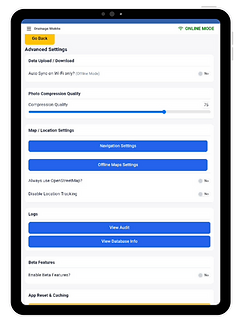
Smarter Image Compression
Upload photos quickly with adjustable image quality—ideal for high-res cameras and limited data connections.
Reliable Online & Offline Use
Work anywhere—online or offline. Download what you need in advance and sync seamlessly when back online.


